
Features
Everything you need to run a project from afar.
Several building blocks that fit together: a container (project), progress units (checkpoints), proofs, members, a history, messages, validations and calm notifications.
Projects
Root container
Checkpoints
Progress units
Proofs
Photo, video, PDF
Members
4 clear roles
History
Auto timeline
Messages
Per checkpoint
Validations
No ambiguity
Alerts
Calm, targeted
01 · Root container
Projects & templates
Everything starts with a project. Pick a template that fits your case, or start from a blank page. In 30 seconds you have a starting structure.
- Several templates cover the most common diaspora projects (construction, renovation, schooling, family events, supporting a relative…)
- Each template pre-fills typical checkpoints, freely editable
- Blank template for projects that don't fit any category
- Rename, archive and duplicate in one click
Quel type de projet ?
02 · Progress units
Clear checkpoints
A checkpoint is a concrete step: a title, a status, an estimated date, an owner, attached proofs. The project moves forward checkpoint by checkpoint.
- Statuses: upcoming, in progress, validated, more requested
- Reorder by drag-and-drop, add new ones as you go
- Each checkpoint has its own discussion thread and its own proofs
- Optional locking: a checkpoint can only start once the previous one is validated
Checkpoints
Fondations
Validé · 14 mai
Murs porteurs
En cours · 3 preuves
Toiture
À venir · juillet
03 · Ground truth
Multi-media proofs
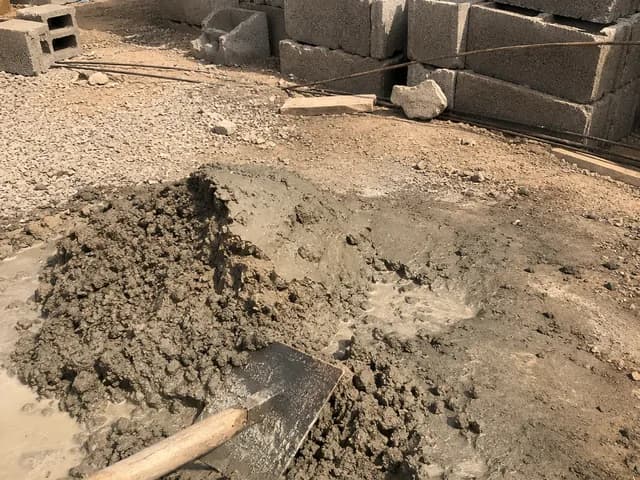
Photos, videos, audio, PDF, receipts. Proof is what turns an “it's moving along” into shared certainty. Dated, geolocated if allowed, kept forever.
- Up to 10 files per proof · 100 MB per file
- Photos compressed before upload (mobile data savings)
- Automatic queuing if the network is slow or drops
- Optional geolocation, dating and timestamp

Ibrahim · Coordinateur
Kinshasa · il y a 2 min


04 · The sinews of war
Fund requests
Who's asking, how much, in what currency, and for what. The on-site coordinator makes the request, the owner validates, adjusts or declines. Everything is tracked: no more blind transfers and “how much did you send again?”.
- The requester enters amount, currency and reason, all attached to a checkpoint
- The owner validates, adjusts the amount or declines in one click, with a comment
- Multi-currency (EUR, USD, FCFA, CDF, GBP…) with automatic conversion at the day's rate
- Full history: who requested what, who validated, at what rate, when
- Coming soon: sending money directly from the project to the coordinator, without leaving Oyeba
Demande #DF-018
Murs porteurs · ciment + briques

Ibrahim · Coordinateur
Kinshasa · il y a 12 min
Montant demandé
Taux 1 EUR = 2 880 CDF · 14 mai
Devis_fournisseur.pdf
Quincaillerie Lubumbashi · 2 pages
05 · A team in sync
Members & roles
Invite everyone with their role. The on-site coordinator posts, the owner validates, contributors participate, observers follow. Permissions adapt to the role.
- Four roles: Owner, Editor, Contributor, Observer
- Invite by email, no account needed beforehand
- Permissions editable per checkpoint if needed
- Ownership transfer and revocation possible at any time
4 membres

Mariam D.
mariam@oyeba.fr
Ibrahim K.
ibrahim@oyeba.fr

Awa T.
awa@oyeba.fr

Tante Bénédicte
benedicte@gmail.com
06 · The project's memory
Timeline & history
Every action leaves a named, timestamped trace. You can go back to day 1 of the project and see exactly who did what, when, and with what comment.
- Automatic log of every important action
- Filters: by member, by checkpoint, by action type
- Full-text search across the whole project
- PDF export of the history for archiving or disputes
Activité · 7 derniers jours
07 · Structured communication
Messages & comments
Text or audio. Messages are attached to the project; comments to proofs and checkpoints. You always find what was said where.
- Text and voice messages (audio recorded in the app)
- Comments linked to proofs and checkpoints
- @member mentions to notify someone specifically
- Emoji reactions to confirm without replying
Murs porteurs · commentaires

08 · Trust made official
Validations
A checkpoint turns green once the owner or an editor validates it. No more grey area: it's official for everyone, at the same time.
- One-click validation, with an optional comment
- Request more if the proof is insufficient
- History: who validated, when, with what reason
- Automatic unlock of the next checkpoint if locking is enabled
Fondations · 3 preuves
✓ Étape validée
Par Mariam · 14 mai · 17:02
« Bon travail. On passe aux murs. »
09 · Intentional calm
Useful notifications
You're notified only when something concerns you. No noise, no spam. Email, mobile push, or both, your choice.
- Smart grouping (daily digest available)
- No notification for actions that don't concern you
- Per-project settings: pause notifications without leaving the project
- “Urgent” mode for funerals or critical deadlines
Notifications · aujourd'hui
Ibrahim a posté 3 preuves sur Fondations
il y a 12 min
Mariam a validé Fondations
il y a 2 h
Awa vous a mentionné dans un commentaire
il y a 4 h